चोर

bazaar

UXR and Web service design project for one of India’s oldest markets.

DigiLocker

Clarifying Purpose, Increasing Adoption

Enhancing user confidence through clearer onboarding, better feature discovery, and intuitive layout.

UX Evaluation

Heuristics

Design System

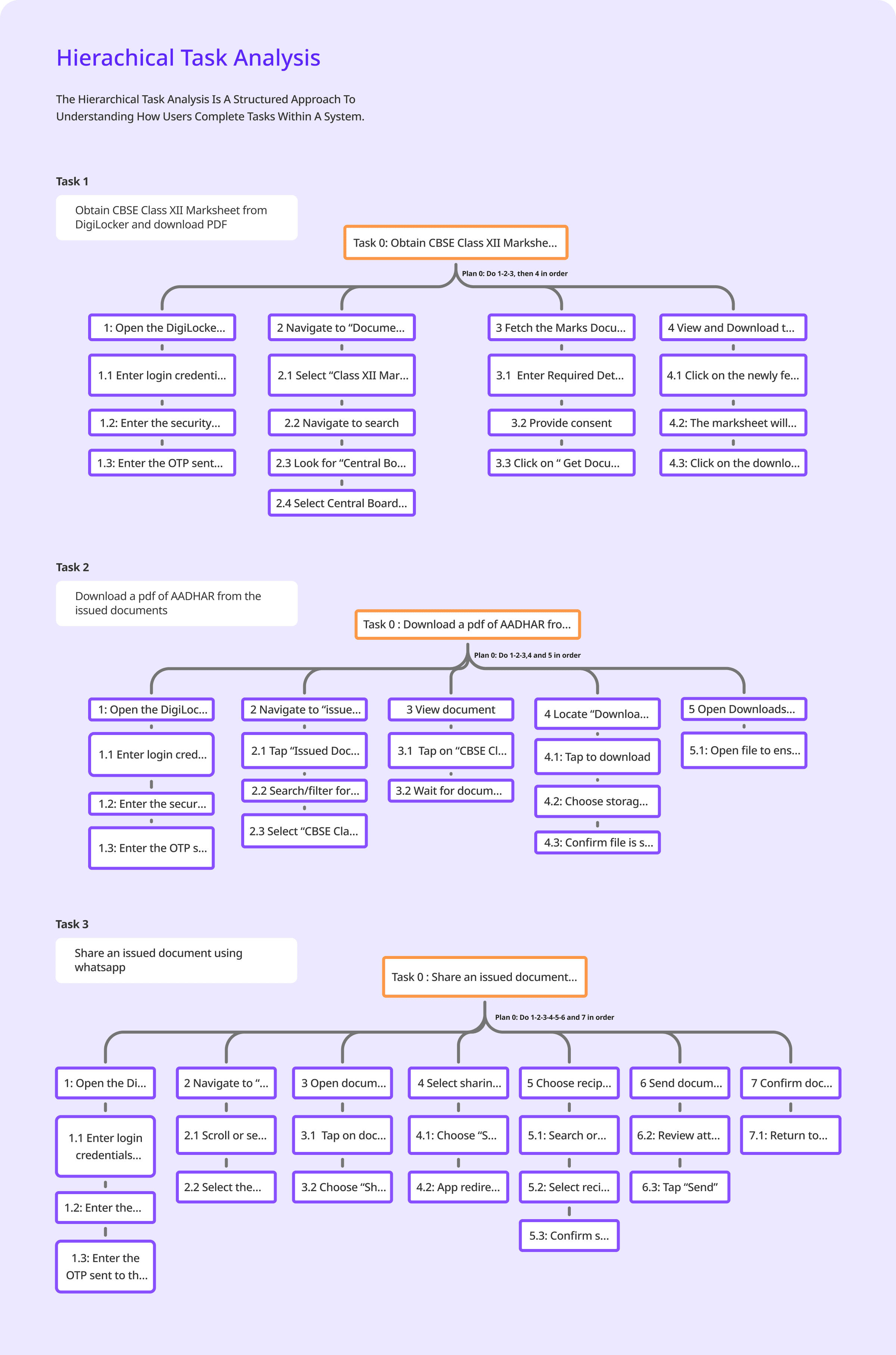
HTA

Redesign

About DigiLocker

DigiLocker is a digital document wallet initiated by the Government of India under its Digital India program.


The application aims to empower users by providing easy access to essential documents anytime and anywhere, reducing the need for physical copies.

key Features

Issued Documents

Fetch and store digital documents directly from registered government and private issuers.

Uploaded Documents

Upload and securely store scanned copies of legacy documents.

Digital Document Storage

Provides users with a secure personal cloud locker to store official digital documents (e.g., Aadhaar, PAN, Driving License, Mark Sheets, etc.).

Integration with Government and Private Agencies

Connected to various departments: CBSE, UIDAI, MoRTH, Income Tax, etc

About the project

This project documents a comprehensive user experience evaluation and redesign of the DigiLocker mobile application. The objective was to identify significant usability issues within the existing interface and propose data-driven design solutions to create a more intuitive and efficient user journey.

Design process

Empathise

Define

Ideate

Prototype

Testing

SUS Testing

Heuristic Evaluation

HTA

Information Architecture

User Testing

Wireframe

User flow

Identified Pain Points

Inconsistent design and navigation

Deep and repetitive navigation paths

Confusing terminology

Unclear document hierarchy

Poor error handling

Small tap targets and dense layouts

Lack of visual feedback

Lack of visual feedback

High cognitive load

System usability Scale

The objective of this test was to evaluate the overall usability and user satisfaction of the DigiLocker application using the System Usability Scale (SUS) method.

51.9

Average SUS Score

0

10

20

30

40

50

60

70

80

90

100

Worst Imaginable

Poor

OK

Good

Better

Best

NOT ACCEPTABLE

MARGINAL

ACCEPTABLE

Qualitative Insights from SUS Patterns

0

60

30

90

10

P1

P2

P3

P4

P5

P6

P7

P8

P9

P10

70

40

100

20

80

50

45

55

49.2

60

58

39.9

47

52

63

49

Visual Hierarchy Issues

User Confidence & Feedback

System status feedback was limited, users weren’t sure if actions succeeded.

No clear confirmation or success animations for major tasks.

Overuse of horizontal scrolling in top sections

Layout inconsistencies across screens (different button placements, uneven spacing).

An average SUS of 52 places the old DigiLocker app below the industry usability benchmark (68).

Users could technically complete tasks, but the app required effort, patience, and prior knowledge.

Complexity in Navigation bar

Many expected search on the home screen, not in the bottom navigation.

“Issued Documents” and “Drive” separation caused confusion users weren’t sure what was used for what.

Low Discoverability

Critical actions like View, Download, and Share were buried in menus.

Icons were unfamiliar

Analysis of HTA

Usability Rating (1-5)

0

1

2

3

4

5

Learnability

Efficiency

Memorability

Error

tolerance

Satisfaction

Usability Impact

Across the three tested workflows, users were able to eventually complete their goals, but with high effort, multiple steps, and low confidence.

Cross-Task Usability Problems

0.5

1.5

2.5

3.5

1

0

2

3

Navigation complexity

Severity Level (1 = Low , 3 = High)

Problem Type

Severity

High

High

High

Medium

Medium

Medium

Low–Medium

Low feedback clarity

Ambiguous labels/icons

Cognitive overload

Mobile

interaction

issues

Terminology mismatch

Slow perceived performance

User Flow

Information Architecture

DigiLocker contains multiple sections like Issued Documents, Uploaded Documents, Search, Profile, Add Documents, etc. but users found it confusing where to go for certain tasks.


Information Architecture helped us in-

Categorise content clearly

Define logical groupings and hierarchies

Ensure the navigation matched how users naturally think, not how data was .


Low Fidelity Wireframes

Mid Fidelity Wireframes

Landing page

More Documents

9:41

􀛨

􀙇

Search for “Aadhar Card”

Hello Akshara!

Welcome back to DigiLocker

Documents you might need

See all

DigiLocker Utility

See all

Issued Documents

See all

Authenticator

Verifiable Credential

Drive

Nominee

Govt. Employee

Driver’s Licence

My Consents

Vehicle Registration

X and XII Marksheet

Ration Card

My QR

My Activity

Profile

Issued Documents

More Documents

Home

Pan Card

12th marksheet

Voter ID

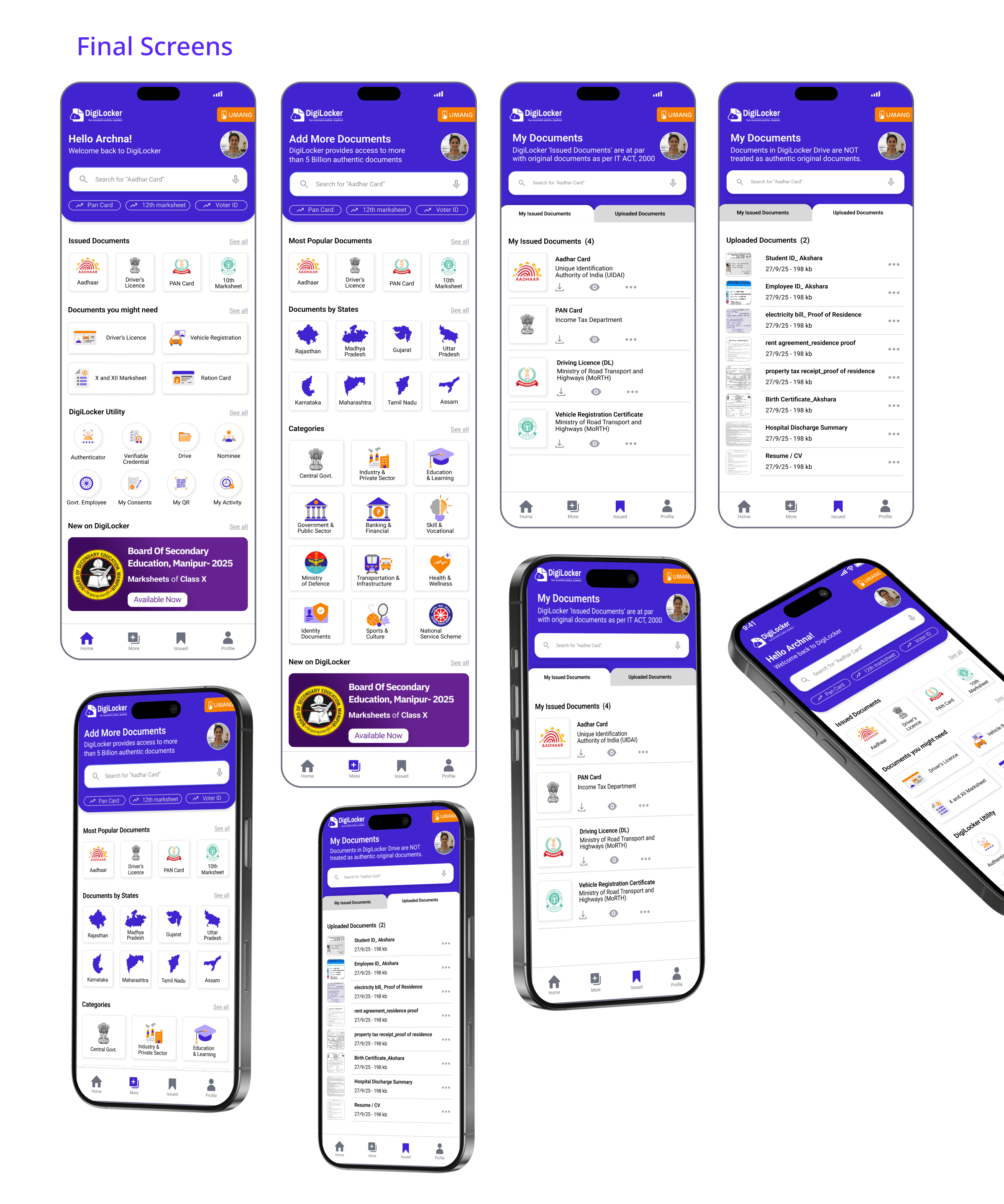
Added “Search Bar” at the top of the page, that allows user to search for documents faster, and also reducing the number of interactions.

Search for “Aadhar Card”

DigiLocker provides access to more than 5 Billion authentic documents

Most Popular Documents

States

See all

Categories

See all

9:41

􀛨

􀙇

Home

Profile

Issued Documents

More Documents

Static options for “most popular documents”

Added a button for UMANG app at the top.

Removed horizontal scrolling to static icons for issued documents.

Reduced Digilocker utility to 8 categories based on most relevance.

Instead of adding all the options in one screen, added a “see all” option for better categorisation

Added “More Documents” in the bottom Nav for easier access.

Issued Documents

Uploaded Documents

View

Search for “Aadhar Card”

Issued Documents

My Issued Documents (4)

DigiLocker 'Issued Documents' are at par with original documents as per IT ACT, 2000

9:41

􀛨

􀙇

Vehicle Registration Certificate

Ministry of Road Transport and Highways (MoRTH)

Driving Licence (DL)

Ministry of Road Transport and Highways (MoRTH)

PAN Card

Income Tax Department

Aadhar Card

Unique Identification Authority of India (UIDAI)

Uploaded Documents

My Issued Documents

Home

Profile

Issued Documents

More Documents

Search for “Aadhar Card”

Uploaded Documents

Uploaded Documents (2)

9:41

􀛨

􀙇

Uploaded Documents

My Issued Documents

Student ID_ Akshara

27/9/25 - 198 kb

property tax receipt_proof of residence

27/9/25 - 198 kb

electricity bill_ Proof of Residence

27/9/25 - 198 kb

Hospital Discharge Summary

27/9/25 - 198 kb

Employee ID_ Akshara

27/9/25 - 198 kb

Birth Certificate_Akshara

27/9/25 - 198 kb

rent agreement_residence proof

27/9/25 - 198 kb

Resume / CV

27/9/25 - 198 kb

Home

Profile

Issued Documents

More Documents

Documents in DigiLocker Drive are NOT treated as authentic original documents.

Search for “Aadhar Card”

Issued Documents

My Issued Documents (4)

9:41

􀛨

􀙇

Vehicle Registration Certificate

Ministry of Road Transport and Highways (MoRTH)

Driving Licence (DL)

Ministry of Road Transport and Highways (MoRTH)

PAN Card

Income Tax Department

Aadhar Card

Unique Identification Authority of India (UIDAI)

Uploaded Documents

My Issued Documents

Home

Profile

Issued Documents

More Documents

DigiLocker 'Issued Documents' are at par with original documents as per IT ACT, 2000

Added a tab for “My Issued Documents” and “Uploaded Documents”

Added a pop up option for View instead of it opening a new page

Added a tab “Download” “View” for quick access

Added “Thumbnail” and “Download” option

Thank You For scrolling!

Project by: Anubhuti & Pragya

चोर

bazaar

UXR and Web service design project for one of India’s oldest markets.

DigiLocker

Clarifying Purpose, Increasing Adoption

Enhancing user confidence through clearer onboarding, better feature discovery, and intuitive layout.

UX Evaluation

Heuristics

Design System

HTA

Redesign
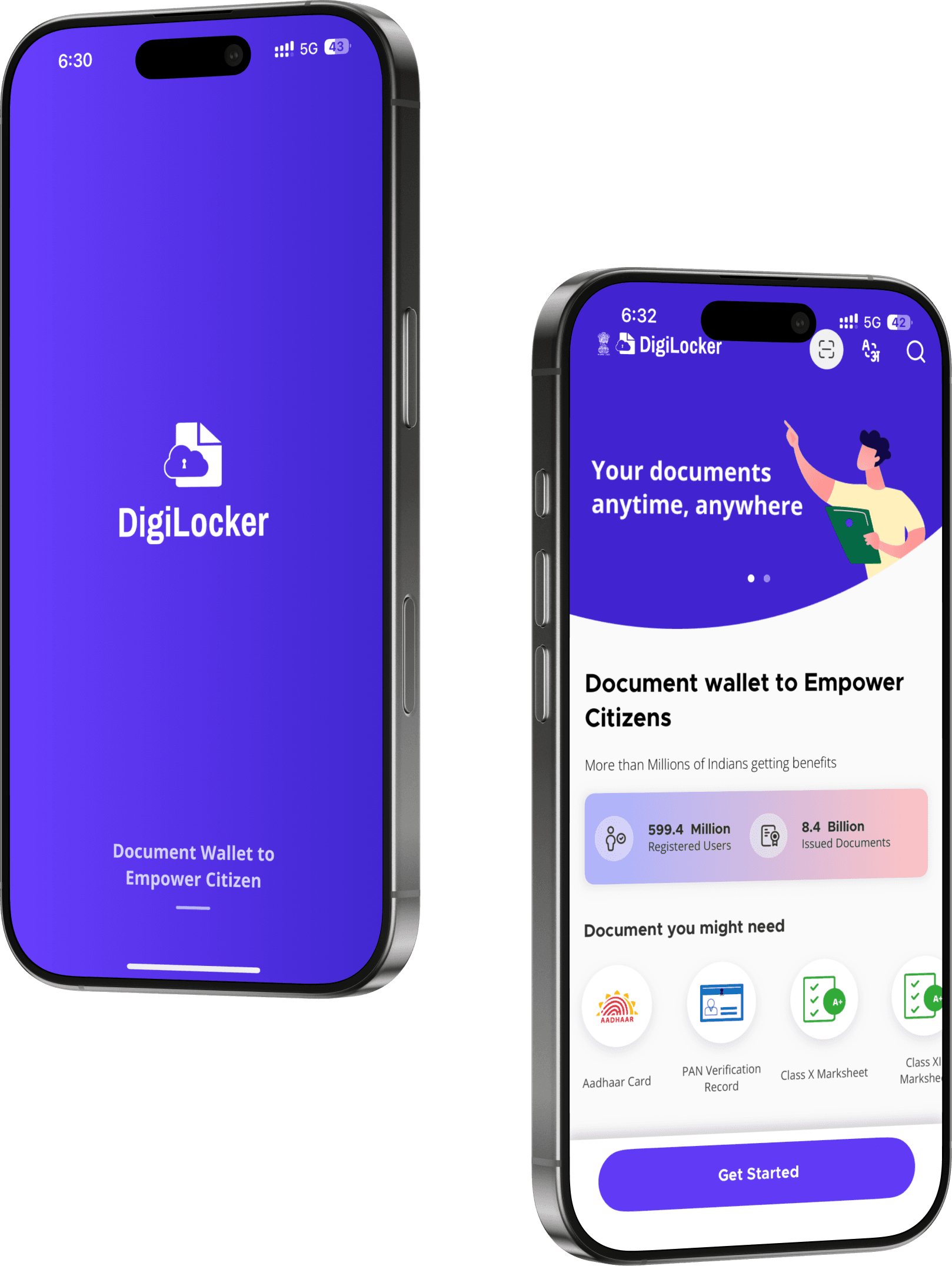
About DigiLocker

DigiLocker is a digital document wallet initiated by the Government of India under its Digital India program.


The application aims to empower users by providing easy access to essential documents anytime and anywhere, reducing the need for physical copies.

key Features

Issued Documents

Fetch and store digital documents directly from registered government and private issuers.

Uploaded Documents

Upload and securely store scanned copies of legacy documents.

Digital Document Storage

Provides users with a secure personal cloud locker to store official digital documents (e.g., Aadhaar, PAN, Driving License, Mark Sheets, etc.).

Integration with Government and Private Agencies

Connected to various departments: CBSE, UIDAI, MoRTH, Income Tax, etc

About the project

This project documents a comprehensive user experience evaluation and redesign of the DigiLocker mobile application. The objective was to identify significant usability issues within the existing interface and propose data-driven design solutions to create a more intuitive and efficient user journey.

Design process

Empathise

Define

Ideate

Prototype

Testing

SUS Testing

Heuristic Evaluation

HTA

Information Architecture

User Testing

Wireframe

User flow

Identified Pain Points

Inconsistent design and navigation

Deep and repetitive navigation paths

Confusing terminology

Unclear document hierarchy

Poor error handling

Small tap targets and dense layouts

Lack of visual feedback

Lack of visual feedback

High cognitive load

System usability Scale

The objective of this test was to evaluate the overall usability and user satisfaction of the DigiLocker application using the System Usability Scale (SUS) method.

51.9

Average SUS Score

0

10

20

30

40

50

60

70

80

90

100

Worst Imaginable

Poor

OK

Good

Better

Best

NOT ACCEPTABLE

MARGINAL

ACCEPTABLE

Qualitative Insights from SUS Patterns

0

60

30

90

10

P1

P2

P3

P4

P5

P6

P7

P8

P9

P10

70

40

100

20

80

50

45

55

49.2

60

58

39.9

47

52

63

49

Visual Hierarchy Issues

User Confidence & Feedback

System status feedback was limited, users weren’t sure if actions succeeded.

No clear confirmation or success animations for major tasks.

Overuse of horizontal scrolling in top sections

Layout inconsistencies across screens (different button placements, uneven spacing).

An average SUS of 52 places the old DigiLocker app below the industry usability benchmark (68).

Users could technically complete tasks, but the app required effort, patience, and prior knowledge.

Complexity in Navigation bar

Many expected search on the home screen, not in the bottom navigation.

“Issued Documents” and “Drive” separation caused confusion users weren’t sure what was used for what.

Low Discoverability

Critical actions like View, Download, and Share were buried in menus.

Icons were unfamiliar

Analysis of HTA

Usability Rating (1-5)

0

1

2

3

4

5

Learnability

Efficiency

Memorability

Error

tolerance

Satisfaction

Usability Impact

Across the three tested workflows, users were able to eventually complete their goals, but with high effort, multiple steps, and low confidence.

Cross-Task Usability Problems

0.5

1.5

2.5

3.5

1

0

2

3

Navigation complexity

Severity Level (1 = Low , 3 = High)

Problem Type

Severity

High

High

High

Medium

Medium

Medium

Low–Medium

Low feedback clarity

Ambiguous labels/icons

Cognitive overload

Mobile

interaction

issues

Terminology mismatch

Slow perceived performance

User Flow

Information Architecture

DigiLocker contains multiple sections like Issued Documents, Uploaded Documents, Search, Profile, Add Documents, etc. but users found it confusing where to go for certain tasks.


Information Architecture helped us in-

Categorise content clearly

Define logical groupings and hierarchies

Ensure the navigation matched how users naturally think, not how data was .


Low Fidelity Wireframes

Mid Fidelity Wireframes

Landing page

More Documents

9:41

􀛨

􀙇

Search for “Aadhar Card”

Hello Akshara!

Welcome back to DigiLocker

Documents you might need

See all

DigiLocker Utility

See all

Issued Documents

See all

Authenticator

Verifiable Credential

Drive

Nominee

Govt. Employee

Driver’s Licence

My Consents

Vehicle Registration

X and XII Marksheet

Ration Card

My QR

My Activity

Profile

Issued Documents

More Documents

Home

Pan Card

12th marksheet

Voter ID

Added “Search Bar” at the top of the page, that allows user to search for documents faster, and also reducing the number of interactions.

Search for “Aadhar Card”

DigiLocker provides access to more than 5 Billion authentic documents

Most Popular Documents

States

See all

Categories

See all

9:41

􀛨

􀙇

Home

Profile

Issued Documents

More Documents

Static options for “most popular documents”

Added a button for UMANG app at the top.

Removed horizontal scrolling to static icons for issued documents.

Reduced Digilocker utility to 8 categories based on most relevance.

Instead of adding all the options in one screen, added a “see all” option for better categorisation

Added “More Documents” in the bottom Nav for easier access.

Issued Documents

Uploaded Documents

View

Search for “Aadhar Card”

Issued Documents

My Issued Documents (4)

DigiLocker 'Issued Documents' are at par with original documents as per IT ACT, 2000

9:41

􀛨

􀙇

Vehicle Registration Certificate

Ministry of Road Transport and Highways (MoRTH)

Driving Licence (DL)

Ministry of Road Transport and Highways (MoRTH)

PAN Card

Income Tax Department

Aadhar Card

Unique Identification Authority of India (UIDAI)

Uploaded Documents

My Issued Documents

Home

Profile

Issued Documents

More Documents

Search for “Aadhar Card”

Uploaded Documents

Uploaded Documents (2)

9:41

􀛨

􀙇

Uploaded Documents

My Issued Documents

Student ID_ Akshara

27/9/25 - 198 kb

property tax receipt_proof of residence

27/9/25 - 198 kb

electricity bill_ Proof of Residence

27/9/25 - 198 kb

Hospital Discharge Summary

27/9/25 - 198 kb

Employee ID_ Akshara

27/9/25 - 198 kb

Birth Certificate_Akshara

27/9/25 - 198 kb

rent agreement_residence proof

27/9/25 - 198 kb

Resume / CV

27/9/25 - 198 kb

Home

Profile

Issued Documents

More Documents

Documents in DigiLocker Drive are NOT treated as authentic original documents.

Search for “Aadhar Card”

Issued Documents

My Issued Documents (4)

9:41

􀛨

􀙇

Vehicle Registration Certificate

Ministry of Road Transport and Highways (MoRTH)

Driving Licence (DL)

Ministry of Road Transport and Highways (MoRTH)

PAN Card

Income Tax Department

Aadhar Card

Unique Identification Authority of India (UIDAI)

Uploaded Documents

My Issued Documents

Home

Profile

Issued Documents

More Documents

DigiLocker 'Issued Documents' are at par with original documents as per IT ACT, 2000

Added a tab for “My Issued Documents” and “Uploaded Documents”

Added a pop up option for View instead of it opening a new page

Added a tab “Download” “View” for quick access

Added “Thumbnail” and “Download” option

Thank You For scrolling!

Project by: Anubhuti & Pragya

चोर

bazaar

UXR and Web service design project for one of India’s oldest markets.

DigiLocker

Clarifying Purpose, Increasing Adoption

Enhancing user confidence through clearer onboarding, better feature discovery, and intuitive layout.

UX Evaluation

Heuristics

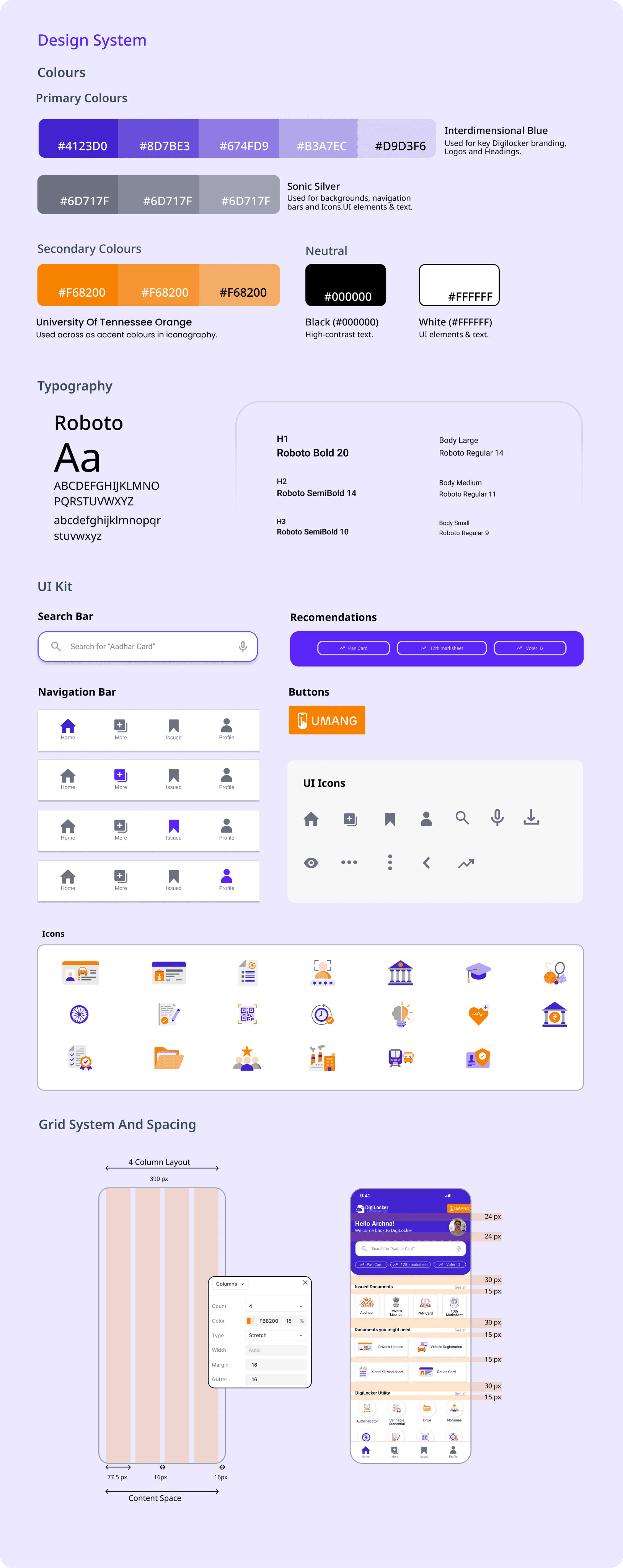
Design System

HTA

Redesign

About DigiLocker

DigiLocker is a digital document wallet initiated by the Government of India under its Digital India program.


The application aims to empower users by providing easy access to essential documents anytime and anywhere, reducing the need for physical copies.

key Features

Issued Documents

Fetch and store digital documents directly from registered government and private issuers.

Uploaded Documents

Upload and securely store scanned copies of legacy documents.

Digital Document Storage

Provides users with a secure personal cloud locker to store official digital documents (e.g., Aadhaar, PAN, Driving License, Mark Sheets, etc.).

Integration with Government and Private Agencies

Connected to various departments: CBSE, UIDAI, MoRTH, Income Tax, etc

About the project

This project documents a comprehensive user experience evaluation and redesign of the DigiLocker mobile application. The objective was to identify significant usability issues within the existing interface and propose data-driven design solutions to create a more intuitive and efficient user journey.

Design process

Empathise

Define

Ideate

Prototype

Testing

SUS Testing

Heuristic Evaluation

HTA

Information Architecture

User Testing

Wireframe

User flow

Identified Pain Points

Inconsistent design and navigation

Deep and repetitive navigation paths

Confusing terminology

Unclear document hierarchy

Poor error handling

Small tap targets and dense layouts

Lack of visual feedback

Lack of visual feedback

High cognitive load

System usability Scale

The objective of this test was to evaluate the overall usability and user satisfaction of the DigiLocker application using the System Usability Scale (SUS) method.

51.9

Average SUS Score

0

10

20

30

40

50

60

70

80

90

100

Worst Imaginable

Poor

OK

Good

Better

Best

NOT ACCEPTABLE

MARGINAL

ACCEPTABLE

Qualitative Insights from SUS Patterns

0

60

30

90

10

P1

P2

P3

P4

P5

P6

P7

P8

P9

P10

70

40

100

20

80

50

45

55

49.2

60

58

39.9

47

52

63

49
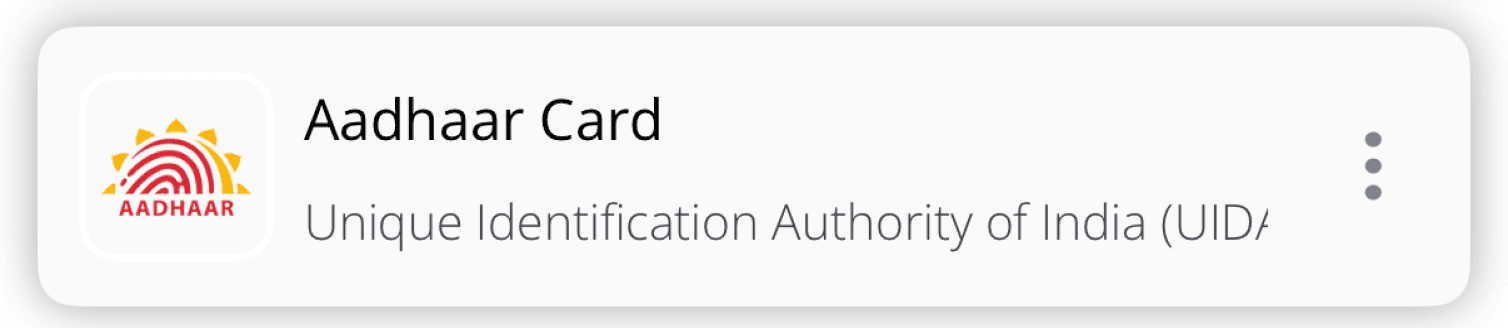
Visual Hierarchy Issues

User Confidence & Feedback

System status feedback was limited, users weren’t sure if actions succeeded.

No clear confirmation or success animations for major tasks.
Overuse of horizontal scrolling in top sections

Layout inconsistencies across screens (different button placements, uneven spacing).

An average SUS of 52 places the old DigiLocker app below the industry usability benchmark (68).

Users could technically complete tasks, but the app required effort, patience, and prior knowledge.

Complexity in Navigation bar

Many expected search on the home screen, not in the bottom navigation.

“Issued Documents” and “Drive” separation caused confusion users weren’t sure what was used for what.

Low Discoverability

Critical actions like View, Download, and Share were buried in menus.

Icons were unfamiliar
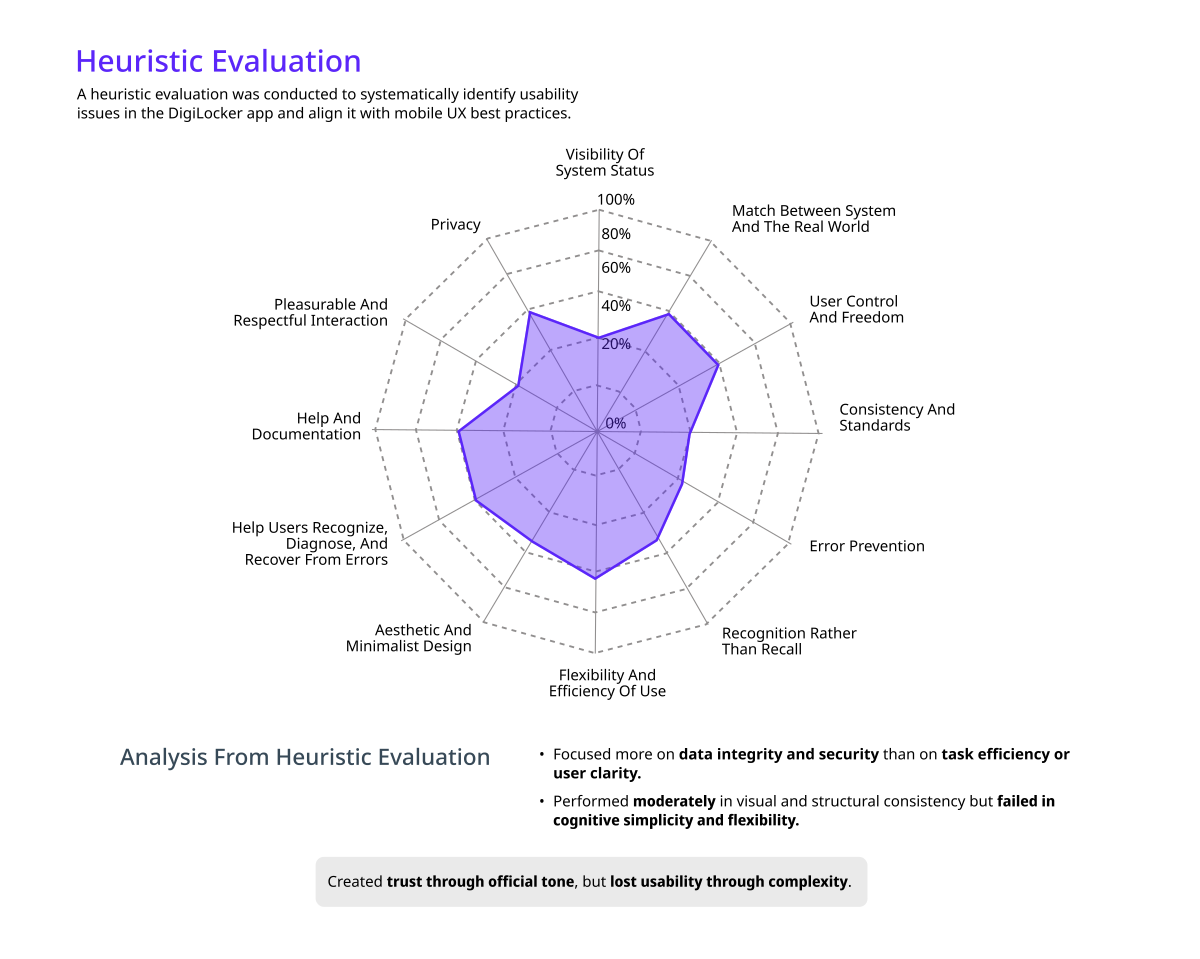
Analysis of HTA

Usability Rating (1-5)

0

1

2

3

4

5

Learnability

Efficiency

Memorability

Error

tolerance

Satisfaction

Usability Impact

Across the three tested workflows, users were able to eventually complete their goals, but with high effort, multiple steps, and low confidence.

Cross-Task Usability Problems

0.5

1.5

2.5

3.5

1

0

2

3

Navigation complexity

Severity Level (1 = Low , 3 = High)

Problem Type

Severity

High

High

High

Medium

Medium

Medium

Low–Medium

Low feedback clarity

Ambiguous labels/icons

Cognitive overload

Mobile

interaction

issues

Terminology mismatch

Slow perceived performance

User Flow
Information Architecture

DigiLocker contains multiple sections like Issued Documents, Uploaded Documents, Search, Profile, Add Documents, etc. but users found it confusing where to go for certain tasks.


Information Architecture helped us in-

Categorise content clearly

Define logical groupings and hierarchies

Ensure the navigation matched how users naturally think, not how data was .


Low Fidelity Wireframes
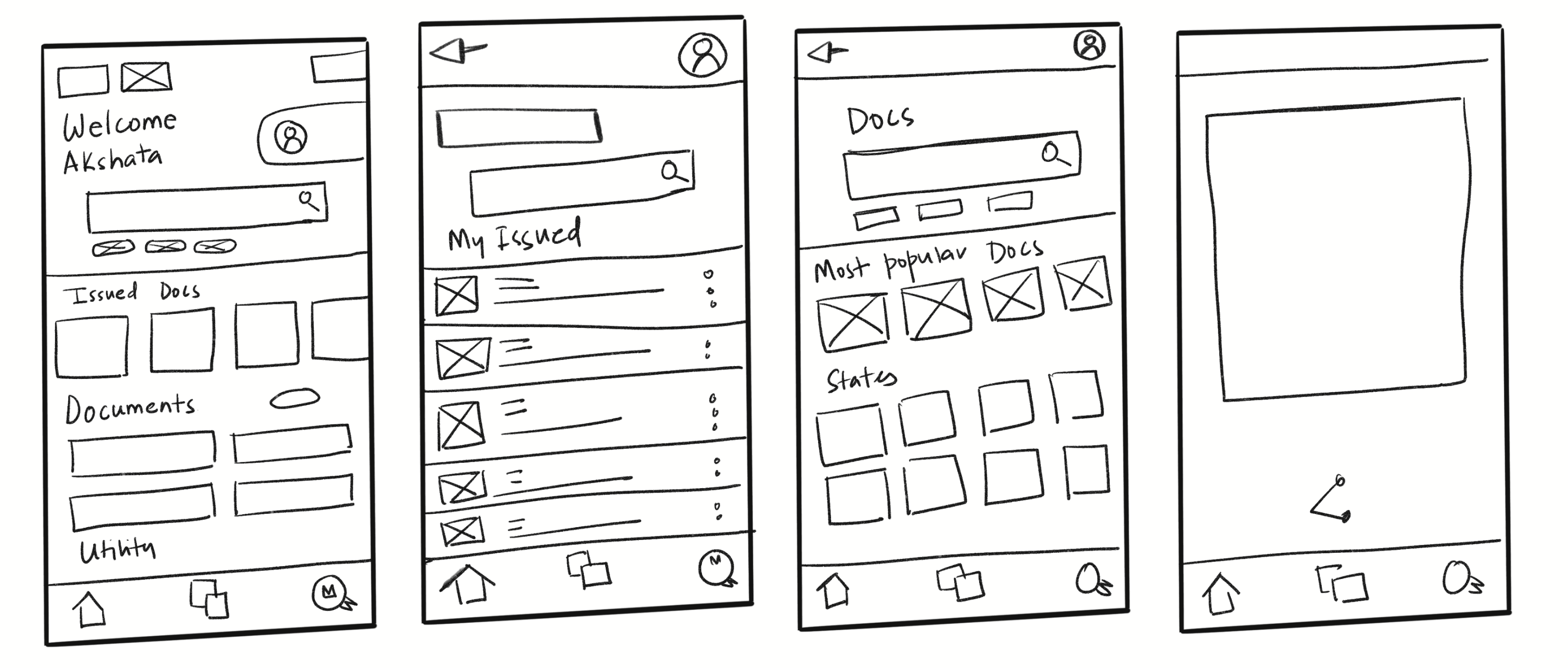
Mid Fidelity Wireframes

Landing page

More Documents
9:41

􀛨

􀙇

Search for “Aadhar Card”

Hello Akshara!

Welcome back to DigiLocker

Documents you might need

See all

DigiLocker Utility

See all

Issued Documents

See all

Authenticator

Verifiable Credential

Drive

Nominee

Govt. Employee

Driver’s Licence

My Consents

Vehicle Registration

X and XII Marksheet

Ration Card

My QR

My Activity

Profile

Issued Documents

More Documents

Home

Pan Card

12th marksheet

Voter ID

Added “Search Bar” at the top of the page, that allows user to search for documents faster, and also reducing the number of interactions.

Search for “Aadhar Card”

DigiLocker provides access to more than 5 Billion authentic documents

Most Popular Documents

States

See all

Categories

See all

9:41

􀛨

􀙇

Home

Profile

Issued Documents

More Documents

Static options for “most popular documents”

Added a button for UMANG app at the top.

Removed horizontal scrolling to static icons for issued documents.

Reduced Digilocker utility to 8 categories based on most relevance.

Instead of adding all the options in one screen, added a “see all” option for better categorisation

Added “More Documents” in the bottom Nav for easier access.

Issued Documents

Uploaded Documents

View

Search for “Aadhar Card”

Issued Documents

My Issued Documents (4)

DigiLocker 'Issued Documents' are at par with original documents as per IT ACT, 2000

9:41

􀛨

􀙇

Vehicle Registration Certificate

Ministry of Road Transport and Highways (MoRTH)

Driving Licence (DL)

Ministry of Road Transport and Highways (MoRTH)

PAN Card

Income Tax Department

Aadhar Card

Unique Identification Authority of India (UIDAI)

Uploaded Documents

My Issued Documents

Home

Profile

Issued Documents

More Documents

Search for “Aadhar Card”

Uploaded Documents

Uploaded Documents (2)

9:41

􀛨

􀙇

Uploaded Documents

My Issued Documents

Student ID_ Akshara

27/9/25 - 198 kb

property tax receipt_proof of residence

27/9/25 - 198 kb

electricity bill_ Proof of Residence

27/9/25 - 198 kb

Hospital Discharge Summary

27/9/25 - 198 kb

Employee ID_ Akshara

27/9/25 - 198 kb

Birth Certificate_Akshara

27/9/25 - 198 kb

rent agreement_residence proof

27/9/25 - 198 kb

Resume / CV

27/9/25 - 198 kb

Home

Profile

Issued Documents

More Documents

Documents in DigiLocker Drive are NOT treated as authentic original documents.

Search for “Aadhar Card”

Issued Documents

My Issued Documents (4)

9:41

􀛨

􀙇

Vehicle Registration Certificate

Ministry of Road Transport and Highways (MoRTH)

Driving Licence (DL)

Ministry of Road Transport and Highways (MoRTH)

PAN Card

Income Tax Department

Aadhar Card

Unique Identification Authority of India (UIDAI)

Uploaded Documents

My Issued Documents

Home

Profile

Issued Documents

More Documents

DigiLocker 'Issued Documents' are at par with original documents as per IT ACT, 2000

Added a tab for “My Issued Documents” and “Uploaded Documents”

Added a pop up option for View instead of it opening a new page

Added a tab “Download” “View” for quick access

Added “Thumbnail” and “Download” option
Thank You For scrolling!

Project by: Anubhuti & Pragya